Archive for the ‘Misc’ Category

OCL : subSequence

I think I’ve mentioend before that I’ve been working on an internal website using ASP.NET and ECO II. Partly because replacing the current site (based on static HTML) is going to make my life a lot easier, but also as I kinda miss coding as a day job, and of course if you want to really learn a new technology like ECO, there’s no substitute for actually building and deploying an app into production.

Anyway, one of the things I wanted to do was to display summary lists of items on the main page of the site. You know, recently posted items, important upcoming dates, last 10 posts to the SE mailing list, etc. Most of this is easy, OCL like the following will pull out all Items in reverse order (ie. most newest to oldest).

Item.allInstances->orderdescending(ModifiedTime)

Problem is, I don’t want to display all Items, only the most recent items, say, the last 10. Enter the subSequence operator:

Item.allInstances->orderdescending(ModifiedTime)->subSequence(1,10)

With this, I have a list of 10 Items, starting at position 1 in my list of Items ordered by ModifiedTime. Perfect!

Technorati Tags: ,

ECOSpaceDebugger

ECO lets you move from building your model to executing and interacting with that model incredibly quickly. The model-aware framework with its databinding support, autoforms capabilities, etc mean you can build UI’s that let you play with your model faster than any other tool.

However, ungrateful bugger that I am, I’m now spoiled and "incredibly quickly" just isn’t fast enough anymore. What I want is a way to create my model, and without setting up anything, I want to be able to interact with it. Or more often, change my model, and test out my changes immediately, without adding the necesary UI bits until I know that it works how I want it to work.

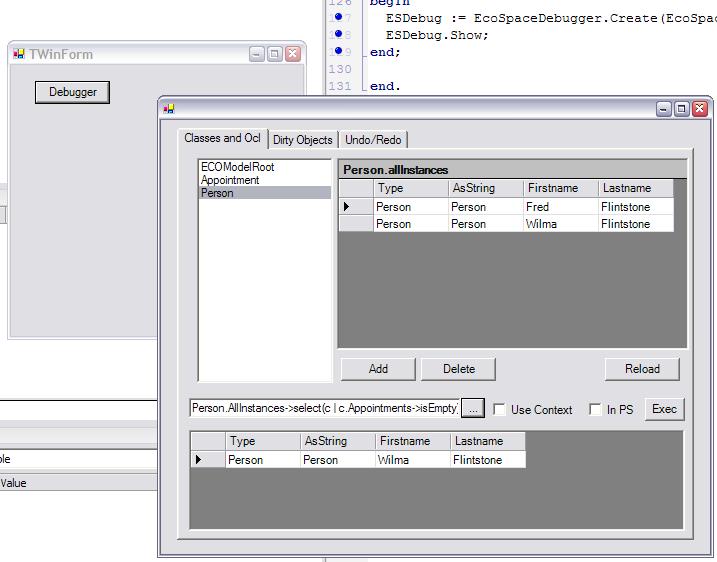
Well, lurking away in a dark corner of the ECO Framework is something that gets me very close to that. The ECOSpace Debugger gives you a UI that lets you, amongst other things:

  • create, edit and delete instances of objects in your model
  • bring up autoforms for an object
  • set Checkpoints, then undu and redo changes
  • start, commit and rollback object transactions

At the moment you still need to write the code to invoke the ECOSpace Debugger, but it’s only a couple of lines, so that’s still pretty amazing.

Here’s the steps to try it out:

  • Create a new Winforms ECO app
  • Define a few classes and associations in your model
  • Add the Borland.ECO.Diagnostics namespace to your mainform’s uses clause.
  • Drop a button on your mainform, and in the Click event add the following code:

EcoSpaceDebugger.Create(EcoSpace).Show;

That’s it! Run your app, click the button, and you can start playing with your model. Change your model, run the app again and interact with your changes. How simple is that?

If you want to have a bit more of a sniff around, double-click on the Borland.Eco.Windows.Forms.dll in the References section of the Project manager, and drill down into the Borland.Eco.Diagnostics namespace using the Reflection tool built into the IDE.

I did say I was ungrateful. Now that I have this, I want to get rid of that button and line of source. Like maybe by creating a non-visual component that shows the debugger on create, if a boolean property is set to true. Hmmm, maybe on my next flight…

Technorati Tags: ,

Custom OCL Operations

Jonas has just updated the ECO pmwiki with an interesting post on creating custom OCL operations, along with an example that implements a bunch of DateTime functionality that you can invoke from OCL. One of the guys mentioned this a few months back, and I’ve been waiting since then to get my hands on it. Hmmm, wonder if I have time to play tonight…..

ECO is Love

Part of the reason I’ve been quiet on the blog lately (apart from work, travel, family life, ill dogs, and just general laziness) is that I’ve been working on a reasonably large ECO/ASP.NET application for use internally in Borland. Eventually I’d like to publish the source code (inspired as I am by Peter Morris) but trust me, you wouldn’t want to see it in its current state.

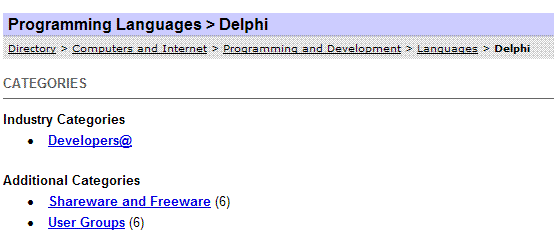
Anyway, back to the point. Being a web app, part of it follows a fairly common web standard of organising content in a hierarchy of categories that users can use to navigate down into more specific areas. Think of the directory structure at Yahoo in the screenshot below
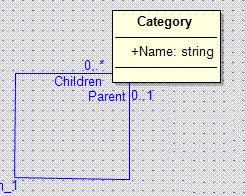
Anyway, this was relatively easy to implement in a model: a Category class that has an auto-association (ie. an association to itself) such that a Category can have 0..* child categories, and a Category can have 0..1 parent categories. It was also relatively easy to set up in ASP.NET so I could browse my way up and down these categories.
What had me stumped for awhile were the breadcrumbs. Breadcrumbs? Look in the Yahoo screenshot above. Near the top, it has a list of all the ancestor categories as links, so you can work your way back up to where you came from.  I wanted to be able to get a list of the Category objects that make up the path from a specific Category all the way to the root. In the screenshot, it’s Directory, Computers and Internet, Programming and Development, Languages, Delphi from least specific down to most specific. Once I had this in a handle, I could bind it to an ASP.NET Repeater component and Robert’s your mother’s brother. I didn’t only need to access this path for the breadcrumbs, but that’s a nice, visible example of what I needed.

I eventually came up with some fairly convoluted code that walked up the Parent association, adding each to a handle as I went (which involved some pretty funky casting along the way). That worked, but it left a fairly foul taste in my mouth. I thought ECO was supposed to stop me from having to write this sort of pointless plumbing code?

Well, obviously if there wasn’t a better way I wouldn’t be writing this article. After some help from Jesper and Jonas (thanks guys!) here’s my current solution. I’m sure there are others, but I’m kinda fond of this one at the moment.
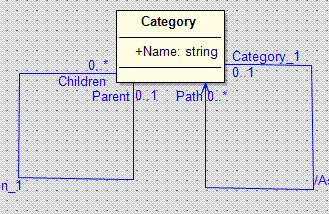
I’ve added a Derived Association, in fact another auto-association, called Path and made it uni-directional. When you reference this association you should get back all categories from the root down to the current Category. To make this happen, the Derivation OCL for the Path association looks like this:

if self.Parent.isNull then
  self->asSet
else
  self.Parent.Path->including(self)
endif

If the current Category is the root, its Parent will be null, and as a result we return a collection of just the current Category. However, if we are somewhere down the tree, then we use the including operator to add the current Category to its Parent’s Path collection (ie. we’re recursively calling this derived association).

Works like a bought one, as you can see in the screenshot below. The top left grid is showing all the Category objects, and also serves to let us select a particular category. The bottom left grid is showing the children of the currently selected Category, and the bottom right grid is showing the contents of the currently selected Category’s Path association. Exactly what I needed.
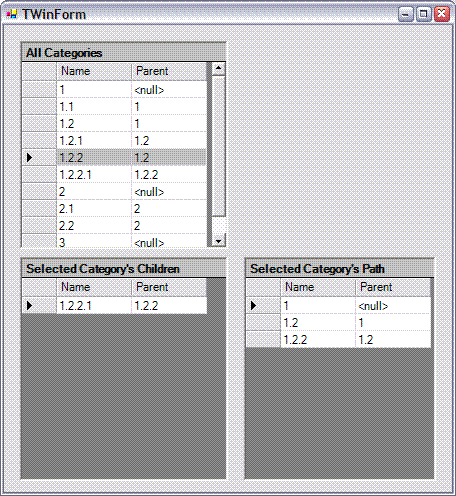
Yes, the result is exactly the same as my convoluted code, and yes I had to learn a bit of OCL (this is the best OCL reference I’ve found so far, BTW. Thank you Anthony), but it just feels so much more ECO-like to be able to tell the framework what I want at a higher level, rather than having to explicitly say how to do it. Sure, I always want to have the option to take control over how things happen, but for stuff like this, I couldn’t care less.

<Sigh> Once again I’m reminded, ECO is love.

Oh, you can download the source for this example here (and yes, I realise I can’t spell, but then Delphi doesn’t spell check my Project names for me, so it’s not my fault).

Technorati Tags: ,,

Attack Analysis

I’ve always found analysis of attempts to hack systems extremely interesting. I’m not sure if this reflects some miscreant leaning on my part, but I’ve enjoyed these ever since I read Cuckoo’s Egg by Clifford Stoll years ago.

I’ve collected up a few links over the years to these types of articles, such as:

Well, I’ve just found Robert Hensing’s blog where he’s been regularly detailing new attacks his team uncovers.

WooHoo! An ECO blog from a non-Borlander

I have a page in OneNote where I grab snippets of newsgroup conversations, emails, etc about ECO that I store away for future reference. The title of this page is "ECO Gems". Well, I just looked through it and a high percentage of my ECO Gems are from Peter Morris.

Why do you care? Well, Peter has started a blog. Definitely subscribed!

Ghost in the Shell 2 : Innocence

I didn’t quite make it to the cinema release in the US, but GITS2 has its premiere in Sydney next weekend, and I have tickets!

Madman has the details (half way down the page, right hand side), but Director Mamoru Oshii and Producer Mitsuhisa Ishikawa will both be there.

I nearly bought it on DVD in Tokyo two weeks back. I was actually lining up at the register with it in my hand, before I realised that version didn’t have English subtitles, let alone an English dub. So, glad I waited to see it on the big screen 🙂