Archive for the ‘Misc’ Category

MenuPalette add-in for Delphi 2007 and C++Builder 2007

Over recent years I’ve become completely addicted to the filter function on the Tool Palette in Delphi and C++Builder. Whether I’m typing in code or in the form designer, Ctrl-Alt-P takes me to the Tool Palette and then I can just start typing to narrow down the component or Gallery Wizard I want to invoke. Create a new Unit? No problem. Ctrl-Alt-P, start typing U, n, then hit enter. Add a button to a form? Same thing, Ctrl-Alt-P, B, u, t, cursor key down a bit, hit enter, all good. Fingers don’t leave the keyboard.

Well, I was sitting in the lounge in Seoul Airport the other week, doing some coding until my flight boarded (the majority of my coding these days is done in airports or airplanes. So much for ergonomics) and I was hunting in vain through the menu items in Delphi, looking for a particular menu item. Can’t remember which one it was, but it was driving me mad trying to find it. I could remember what it was called, but couldn’t find the bloody thing.

Eventually I found it, but I was left wondering why I couldn’t filter the menu items like I could with the Tool palette. Later on the flight, I was nosing around in the Open Tools API and decided to try extending the Tool Palette to include menu items. A bit of muckign about later and MenuPalette was born (yes, I know I have a way with names).

The picture above shows it in action. It drives off the IDE’s main ActionList, and adds a Menu Items group in the Tool palette. Disabled or invisible actions will be invisible in the Tool Palette, it paints the action’s glyph correctly and in the case of menu items with the same name (eg. Options) the tool tip displays correctly to let you tell the difference. I still have to create a quick installer, but I’ll upload it to CodeCentral shortly.

Maybe it will only be of use to old buggers like me who can’t remember where the menu items are, but I suspect there are probably a few of us out there.

Spatial Mixing

I was mixing a new song the other day in Live, and after spending way too much time tweaking the levels and stereo positions of the different tracks, I had an idea for what might be a better way to handle this.

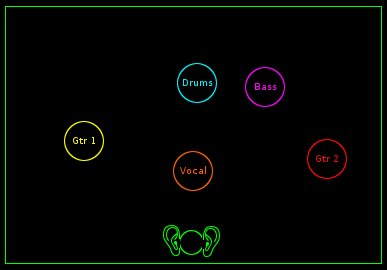
In my head, when I’m doing this, I’m picturing the different instruments and sounds in different locations in a room, with the listener’s ears in the middle of one wall. However, Live, like most tools I’ve seen, make you translate that picture in your head into pan and level settings. I’m no pro, I just do this as a hobby, so this takes me much longer than it should to get right. It’s annoyed me since my 4 track days as a pimply youth. Why not let me simply lay out the tracks spatially, just like I’m picturing it?

What I want is something like the image above, where I can have an icon for each of the tracks, and I can drag them vertically and horizontally to position them in the mix. Obviously, their position on the x-axis would determine the pan, and the position on the y-axis would determine the level.

I’ve actually been thinking about different ways to actually implement this. I best I’ve come up with (or more accurately, the one that sucks the least) is to create a software MIDI controller. This approach would have the benefit of being two way, ie. changes made via the pan and level settings in the DAW could reflect in the software controller, and vice versa. Also, dragging things around during playback would feed midi to the DAW and be recorded as automation. Unfortunately you’d have to map the x and y position of icon to the relevant track’s controls using MIDI learn (or maybe using some sort of Mackie emulation to avoid having to map, but I know zero about how easy Mackie emulation is to do).  Like I said, not ideal, but not as crap as some of my earlier thoughts.

One of which was to build a VST that takes multiple inputs, however AFAIK, this would bypass the host DAW’s pan and level setting per track. I’ve been playing with writing a few VST’s lately, and I think this was a case of "the whole world looking like a nail".

Ideally, DAW manufacturers would simply include this as an alternate Mix view. Would make life a lot easier for both beginners in tools like Garageband, and even more experienced but non-professional people in other tools. You could have standard "templates" or starting points for common mix configurations, then tweak them as needed.

I’ll add it to my list of ideas to implement one day, but hopefully before it gets to the top of the list someone will come along and tell me it’s already been done. Then I could simply use it.

XP SP2 and M-Audio Audiophile (aka If it isn’t broken, don’t fix it)

In my previous post about the BCF2000, I mentioned I upgraded my music PC to XP SP2. While I was doing that I thought I should check out the other drivers for the various bits of kit I have hooked up (MIDI keyboard, audio interface, etc). I noticed that there was a newer driver for my Audiophile, one that depended on XP SP2.

Well, given I’d just upgraded to SP2, this seemed like just the trick. Surely when it comes to drivers, latest is best, right? (Yes, I’m aware of how naive that sounds, but at the time it seemed reasonable).  I downloaded and installed the latest driver, and all hell broke loose.

Live took ages to load, the motorised faders on the BCF2000 took an age to react to changes on screen. Also, I’d lost my lovely low-latency audio recording (I’ve always been able to record guitar by monitoring live through the chain of VST’s, rather than having to use the monitor bypass on the audiophile). I could still get sound (well, some sound, it was far from consistent), but there was obviously something wrong.

In the end, I uninstalled the XP SP2 driver for the Audiophile, and installed the Windows 2000 driver on my XP SP2 system. Perfect. Everything was back to before. I had my low latency monitoring back, Live was snappy again, the BCF2000 reacted in real time, all was good with the world. I’m sure that the updated driver provides all sorts of wonderful benefits (actually, I’m not, but there must be some reason for it to exist) but it’ll be awhile before I try and update that particular driver again.

Ableton Live and the BCF2000

I’ve been looking at different MIDI control surfaces for awhile now. I use Ableton Live, and had been eyeing off the LV2 from Faderfox rather lustfully, however it’s priced way outside my range, even second-hand on ebay. After much research I came across the BCF2000 by Behringer. For my purposes, this was plenty good enough, and the motorised faders were an added bonus, so the other day I finally picked one up.
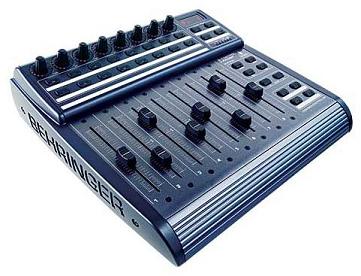
Incidentally, if you’re looking for one of these and you are in Australia, DJ Warehouse in Sydney has them at the best price I was able to find anywhere, by a big margin. Even cheaper than second hand. Worth checking out.

Anyway, it was fairly easy to set up, and using Live’s MIDI Learn functionality, I was up and rolling very quickly. However, here’s where the first downside appeared. The BCF has soooo many knobs, buttons and sliders that mapping them all to Live functions was more than I could face. I scouted around to see if someone else had already done it, unfortunately, not that I could find. Also, even if I had mapped them, as soon as I created a new track, I’d have to stop and map it down to the controller, it can’t just notice there’s a new track and map it across automatically. Live 6 has some new cool auto-magical mapping function, but I’m in Live 5.

Some of the gloss had come off my new acquisition.

However, I came across a few posts on the Ableton forums that gave me some hope. Live can handle Mackie control surfaces, and further, do all the auto-magical-mapping stuff I wanted, even in Live 5. Further, the BCF2000 has a Mackie emulation mode, so in theory I should be able to bypass the MIDI Learn piece altogether. After a couple of hours of digging, I pieced together all the dependencies and it works beautifully. Note, I can’t claim credit for any of these discoveries, all I’m doing is pulling half a dozen different posts together into one place in the hopes that it’ll save someone else some time. Also, I’m running all this on Windows XP, so Mac users will find no joy here (it probably works fine on Macs out of the box, doesn’t everything?)

The crux of the solution is we need to make the BCF2000 behave as a Mackie Control Surface. Here’s what you’ll need:

  • Windows XP SP2 – some of the drivers below depend on this, so if you haven’t upgraded already, do it now. Otherwise Windows will Bluescreen everytime you turn on the BCF in Mackie mode. 
  • Download the latest USB driver from the Behringer site. At the time of writing, this is titled USB MIDI DRIVER (V1.1.1.1) for BCF2000 & BCR2000, but check to see if they’ve released a newer one.
  • Download the firmware update from the same page, currently titled BCF2000 Version 1.10 (70 KB)
  • Download the firmware update utility, also from the same page, cunningly titled Firmware update utility.

Install them in the same order. ie. XP SP2, then the new USB driver, then the firmware update.

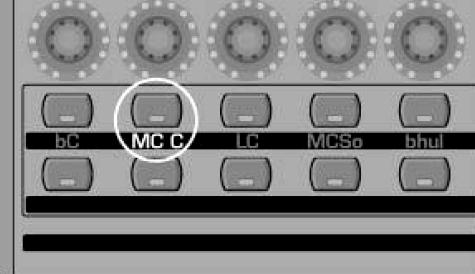
Then you can start the BCF2000 in Mackie Emulation mode, by holding down the second button from the left on the top most row of buttons (look at the picture if that doesn’t make sense). While holding that button down, turn on the BCF, then once you see MC C in the LCD screen, you can let go. It’ll remember the last mode it was set to, so next time you turn it on you don’t have to hold the button down again, it’ll automatically go into Mackie mode.
Lastly, we have to configure Live to treat the BCF as a Mackie device. Open the Preferences dialog in Live and select the MIDI/Sync tab. Note that I do not have the BCF set as a Remote in either the Input or the Output sections. Instead, down the bottom in the Remote Control Surfaces section, I’ve selected MackieControl as the Control Surface, BCF2000 [01] as the Input and the same as the Output.

At this point, without doing any MIDI Learning, you should be able to create a new set in Live, and automatically use the leftmost fader on the BCF to control the first Audio Track’s fader in Live, and equally, changing it in Live should move the Fader on the BCF. Same goes for the Pan control. Insert a new Audio track, and without having to do anything, the corresponding BCF Fader will be mapped. Magic!

The only thing left to discover is what everything is mapped to. Well, another forum member has come to the rescue here, creating the following diagram in the same style as the BCF manuals, but showing the mappings to Live. Note the colour code, based on which if any of the Shift buttons (up under the LCD screen) you have held down at the time.

As I said earlier, I cannot claim credit for figuring this out, I just pulled it together from various posts on the Ableton forum. The real credit goes to the members there, especially djsynchro and by-pass, who’s names kept popping up in the most useful threads.

Now, where did I put my labelmaker?


Technorati Tags: ,

"Doesn’t he know they can’t hear him?"

Well, I was in the US for game 1 of this year’s State of Origin, so had to make do with a series of increasingly drunken SMS updates from a mate instead of seeing QLD win. Game 2 comes around and I’m in Seoul. The timezone worked out much better, but I didn’t hold out much hope of finding somewhere to watch it, but what do you know, we export Rugby League to Korea!

Not entirely sure what the locals made of this strange foreigner who seemed to spend way to much time shouting at the television, but at least I got to see QLD wrap up the series with a 10 – 6 win.
Now, if only the Broncos would get up off the bottom of the ladder…

Singapore Rain

I arrived into Singapore this evening, and the view that greeted me once I got up to my hotel room was awesome.

A torrential downpour was coming across the city directly at me. It looked like a solid wall of water, almost biblical . The crappy camera on my phone doesn’t really do it justice, but being 65 floors up and watching this storm come directly towards me was daunting and exciting at the same time, especially given the damage that the weather had wreaked at home just a few days ago.

Spook Country is coming!

There are not too many writers who’s new books I’ll buy sight-unseen. One of those who fall into this category is William Gibson. Anytime I’m in a bookshop, like some compulsive disorder, I usually find myself checking out the G’s in the sci-fi section just in case he’s released a new book without me hearing about it (I found that Pattern Recognition had been released this way, but it’s a losing proposition, as you are investing hundreds of fruitless searches for that rare OMFG! moment).

Anyway, this morning Amazon’s front page was recommending I pre-order Spook Country, which they are showing is to be published on August 7th. Yay!

I also then found this interview\promo video\thingy on YouTube.

Only a couple of months to go! The problem is reading a new Gibson book invariably drives me down a path of re-reading a bunch of his other books, and my reading pile is teetering precariously as it is.

JAX India Apologies

I guess I should explain why I’m not in India, as I said I would be in this post.

I was on the way there, in the US for meetings, when my grandmother died. She was 99, so not entirely unexpected, but still a shock to the family. She was the last of my grandparents still alive, and understandably my mum was pretty upset.

Not sure what this says about me, but I find myself not that upset. I’d better explain that before you get the wrong idea. I’m sorry I won’t see her again, and I will absolutely miss her, but I feel worse for my mum than for Granny. Granny was always very mentally sharp, even at 99, alert and even fairly physically active. She was relatively independant for someone that age, not living in a nursing home but had her own apartment in a facility that provided meals and basic daytime care if she needed it. She was surrounded by friends and a short distance to family, her church, etc.

However, 4 or 5 weeks ago she had a minor stroke, and then a couple of weeks ago another one. I went to see her in the hospital the weekend before I went to the US and she was not herself at all: confused, frail, and looking down the barrel of not being able to go back to her apartment which she loved, and more importantly, her independant life.

She was so not the Granny I knew, that I can’t help feeling that it’s better that she’s gone on to whatever afterlife she believed in, rather than spending the last little bit of time she had being unhappy and uncomfortable. I’ll miss her, but it would have broken my heart to think that after so many years of being independant and healthy, she would end up living out the last few years of her life like that.

Does that make sense? I hope so. Anyway, fortunately I was able to arrange for Wei Keong to cover for me in India so that I could come back for the funeral (tomorrow in Queensland).

I also should note that when it happened and I told a few of the folks that I was in meetings with in the US (like David I, Jim, Jason and Nick to name a few), not one of them hesitated before saying something to the effect of "Go home. Family comes first". I’ve worked in places where that would have been said, but not with the conviction and the lack of hesitation with which they said it. So thanks guys, it’s a pleasure to work with you all.

To Masoud and the other organisers of JAX India, and to the attendees, very sorry to bail on you, but I’ll make it up to you next time.

Tea Towel Explanation of Australian Politics

This summary of the Australian political landscape made me smile:

"Australia’s ruling conservative party is called the Liberal Party. The opposing, allegedly more liberal party is called the Labor Party (yes, spelled the American way).
Other highlights include the Australian Democrats, who are republicans, the Nationals who are regional, a niche party called One Nation which is highly divisive, and The Greens, who are led by a man named Brown."

Seems perfectly clear to me.

NB : I took the liberty of adding the Nationals bit, which was suggested by someone in the comments to the original.

JAX India 2007

In a couple of weeks time I’ll be in Bangalore for JAX India 2007. As the image below suggests, it’s actually three conferences in one: Eclipse Forum, JAX and Enterprise Architecture.

I was at JAX in Singapore last year and enjoyed it very much, and Masoud and his team at SMS Media have this conference thing down to a fine art. The India one, with three conferences in one, has a great line-up of speakers and sessions so should be a lot of fun.

I’m doing a session on JBuilder, Shelby will be talking Ruby and Rails, and Dave is doing one of the Keynotes. If you are planning on attending, please come up and say Hi.

Of course, a trip to India means another chance to spend way too much time in the worlds greatest bookstore, Gangarams. (Hah! and you thought Amazon held that title).

I’m going to India via the US (for a few days of meetings at headquarters) and Frankfurt, then home via Singapore. Not exactly the most direct route from Australia to India 🙁 I have an evening in Frankfurt to fill, so if anyone has any suggestions, let me know.