If you’ve been to a Borland Conference before, you’ll probably recognise this guy.
Good to see that some things never change.
If you’ve been to a Borland Conference before, you’ll probably recognise this guy.
Good to see that some things never change.
Ok, thanks for everyone who commented or emailed their requests. Here’s the list I have so far (in no particular order):
Some of these I’ll delay until the next release (not telling which of course 😛 ). Don’t be too harsh on me for that, the others will probably take me that long to write anyway, and trust me, some of them will benefit for waiting until then. Of course, keep telling me others and I’ll keep updating the list. Also, feel free to jump in and write some of these yourself 🙂
I’ve got an article mostly done on Optimistic Locking in ECO, and have the examples for one on ECO Variables, but just wondering what else people are interested in me covering here? I’m not really interested in duplicating the tutorials that are already up on the Borland site, but feel free to leave a comment telling me what topics you’d like to see. Speak up, or you’ll just have to put up with me covering whatever takes my fancy.
OK, one more topic to go and then we’ll leave the modelling surface in ECO for awhile to look at other areas. Today’s topic is Association classes. (BTW. I’ve borrowed the idea for this example from the MeetingManager example that ships with Delphi, but the implementation varies a little bit.)
Let’s forget ECO for a second and talk about why we might want Association classes in general.
Think of the model we looked at in the Derived Association example last time. Here it is again to jog your memory.
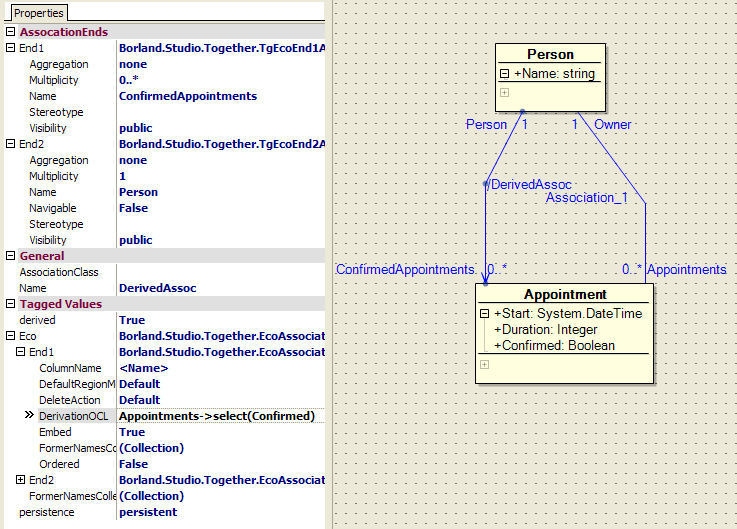
We have a Person class and an Appointment class, and a relationship between them. The Appointment class has attributes for Start, Duration and one for whether or not it is confirmed. It’s this Confirmed attribute I want to focus on.
There is an argument that the Confirmed attribute does not belong on the Appointment class because you don’t actually confirm an appointment, only whether you will attend the appointment. This problem is highlighted if you consider the case of a meeeting with multiple attendees. You need to allow for the fact that some people will attend and some won’t. (Note: The example in this tutorial doesn’t support multiple Person’s per appointment, but it would be reasonable to expect this to occur in a real world application). So where does the Confirmed attribute belong if not on the Appointment ? I’m pretty sure it doesn’t belong on the Person class. The argument goes that Confirmed is actually an attribute of the relationship between the Person and the Appointment. Put another way, you do not confirm an Appointment, you confirm a Person’s participation in an Appointment.
Let’s think of another example. The example that was used to explain this concept to me was employment. If you have a Person class and a Company class, and a relationship between them that indicates employment, where would you put the Start Date of the employment. You wouldn’t put it on the Person (what if they have multiple jobs) and you wouldn’t put it on the Company (what if they have multiple employees). StartDate is really an attribute of the employment itself, which in this case is an association between the two classes.
You may not agree with either of these examples, and there are certainly other ways you can model them. That’s OK. Like most things in software development, there is usually no one right way of doing anything. But Association classes are a perfectly valid modelling construct to use, and can be extremely powerful (more about that further down). Try using them for awhile. Dismissing something from a position of authority is fine, dismissing something from any other position is kinda scary.
So, how do we create an attribute on an association? Well, perhaps not surprisingly, we use an Association class. We create a class and relate it to our association. Any attributes we want to add to the association, we add to our Association class instead. Let’s look at how we might model the changes to our Appointment we discussed above.
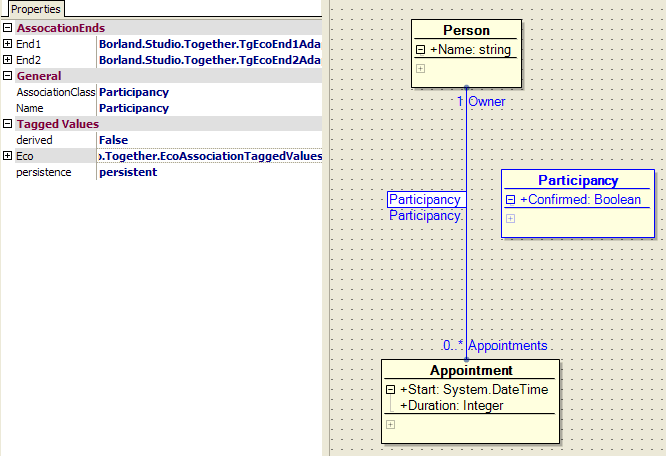
I’ve removed the Derived Relationship for now, but we’ll add it back later. You can see I’ve removed the Confirmed attribute from our Appointment, and added another class called Participancy which contains our Confirmed attribute. this Participancy class is going to be our Association class. An Association class is just a standard ECO class, you don’t do anything special when creating the class to make it an Association class. Just select the association between the two classes and enter the name of the Association class, in this case Participancy, into the AssociationClass attribute. Just to make it stand out, I’ve also change the foreground colour of my participancy class.
So, that was pretty easy, but what does it all mean? In the diagram below, I’ve tried to show what the above arrangement looks like in sourcecode. Note, I’ve built this diagram manually, purely to try and explain what is going on. Don’t go looking for a picture like this in the IDE.
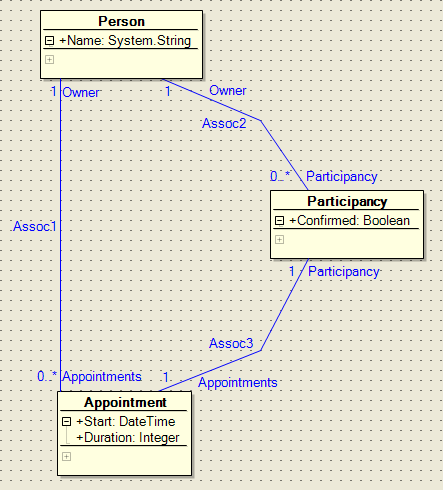
As you can see, we still have our association between Person and Appointments, and we can navigate that with absolutely no reference to our Association class. However, we also have a path between Person and Appointment that goes via our Association class. This effectively gives us two ways of navigating from Person to Appointment. One way we use the existing direct association, and the other way we go via the Association class.
From a Person object, we have an association to a collection of Participancy objects, one for each Appointment we have an association with. From an Appointment object, we have an association back to a single Participany object. This makes sense as an Appointment is only associated with a single Person.
So, I’ll repeat, what does it all mean? Well, it means that I can navigate from my Person to my Appointment (or vice versa) a few ways. Starting at my Person object, I can still say self.Appointments which will return me a collection of Appointment objects, but I can also do this:
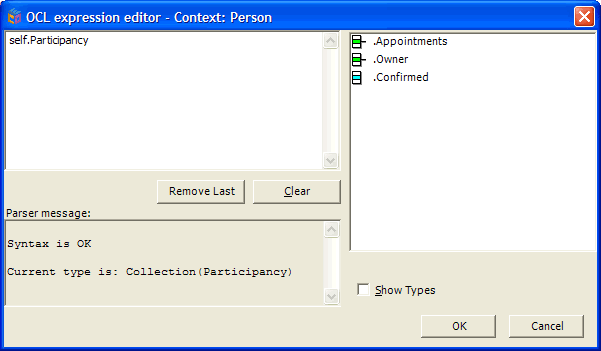
Notice my context (in the caption bar) is still Person. As it says down the bottom, self.Participancy will return me a collection of Participancy objects. Also note on the right hand side that each of these Participancy objects have the confirmed attribute, as well as an Appointments collection and Owner.
If we use that Appointments attribute of the Participancy object by using OCL like this:
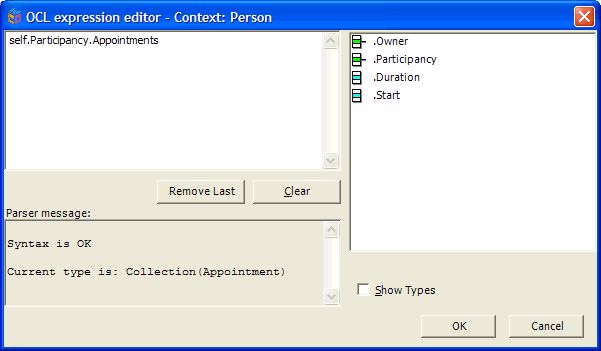
We are now getting back a collection of Appointment objects, with the correct looking attributes (but note, as I mentioned before, our Appointment class now has a Participancy attribute as well).
Using OCL like this:
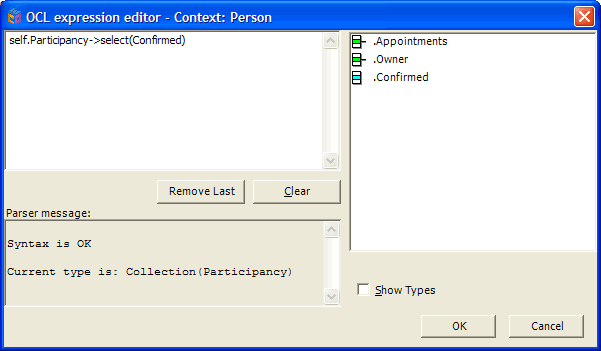
We are now getting back a collection of Participancy objects, but only those where the Confirmed attribute is True. And to complete the set, if we use OCL like this:
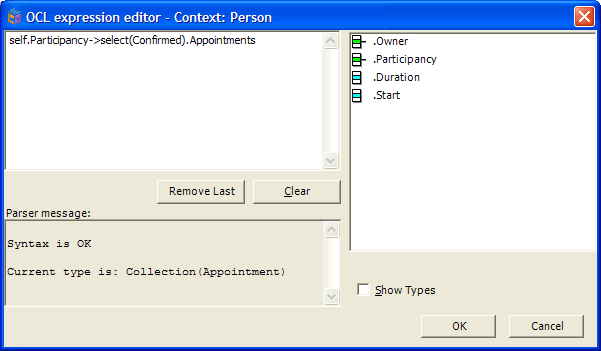
We are getting back a collection of all Appointments for this Person that are confirmed. Of course, you can access things in a similar way from C# or Delphi code, as the attributes are there in code, there’s no black magic going on (We’ll look at accessing ECO from code in much more detail in a later article)
So,hopefully that gives you some feeling for accessing the attributes of an Association class. But my model is still broken, I need to put back the derived relationship from last week, but this time using our Association class. this is pretty easy now, as the last lot of OCL I showed is exactly the OCL I need. So, like last week, create your one way association between Person and Appointment, set it as Derived and Transient, and enter the OCL shown below in the DerivationOCL property
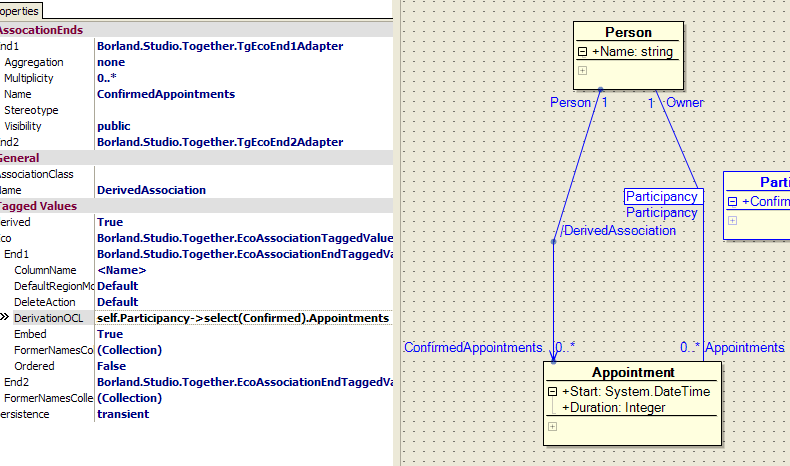
Now, our model is restored and our ConfirmedAppointments derived relationship should work as before. However, by using our Association class, we have hopefully more correctly modelled the true nature of our system. In addition, hopefully you realise that our Participancy class, while an Association class, is still just a class, so it can have attributes, methods and even associations with other classes. Think about that last one for awhile and you might start to see some interesting applications for Association classes.
Like I said before, a lot of times this comes down to personal taste. I’m very happy to argue the relative merits of Association classes, but only if we can do it over a drink 🙂
Feedster just alerted me to the fact that Mike Swindell, Delphi Director and Product Manager has launched his blog. He’s kicked it off with an article on the future of Delphi for Win32.
Cool! One more Borlander blogging, another thousand or so to go.
I’ll be down at CeBIT at Darling Harbour tomorrow afternoon. From 1:30pm till 2:00pm I’ll be presenting at the Microsoft booth on Together for Visual Studio 2.0, so if you are in the neighbourhood, come by and say hello.
Just stumbled across Srinivasa Sivakumar’s list of free sample chapters from (mostly) .NET related books. I kinda expected them to be fairly light on detail and not terribly satisfying, but I’ve just read one on remoting which solved a specific problem I’ve been having. No substitute for the whole book, but a great way to know if they whole book is worth buying. 568 samples and counting.
Whenever my issue of The Delphi Magazine used to arrive, the first thing I would read was Julian Bucknall’s Algorithms column. He’s got such a knack for making complicated and oftentimes fairly dry subject matter not only clear, but interesting as well. I learn new things everytime I read his columns, even when I reread them.
Anyway, he stopped writing them awhile back, but today I stumbled across him twice. He’s blogging, actually, he’s got two blogs. One is on his homepage at www.boyet.com (RSS) and one is over at Falafel (RSS).
Does anyone actually want to interact with their computer like this?
Seems like every few years, somebody pops up and decides that a desktop that looks like your house is exactly what non-computer literate people need to be comfortable using a computer.
I guess I have a couple of problems with this:
1. It’s insulting. It kinda assumes that because someone is not computer-literate, that they are stupid. If you sat my Mum down in front of Windows, she wouldn’t know where to start. But that doesn’t mean she’d be any happier in something like 3DNA. She knows her computer isn’t her living room, and she doesn’t need it to be, she just needs it to be a little more intuitive. Let me give you a simple example. My Mum doesn’t want to have to remember that Powerpoint is for presentations, Outlook is for email, Internet Explorer is for browsing the web, she just wants icons that say "Presentations", "Email", ‘Web". That takes a minute of creating and renaming shortcuts on her desktop, not an investment in some wizz-bang, 3D, virtual reality doo-hickey.
2. It doesn’t work. OK, let’s assume my Mum really does want her PC to look like this. Will this help her get up to speed? I don’t think so. Look at the screen shot on this page. Will a non-computer literate person know that to open a document, they click on Media sign on the wall? Is that intuitive?
3. It doesn’t scale. Ok, let’s assume that 1 and 2 above are wrong, and this IS exactly what my Mum is looking for. What happens once she is comfortable using this interface and wants to get into more advanced stuff. With this, there is not a nice progression over to the "normal" Windows interface. She pretty much has to toss out what she’s learnt and go back to being a newbie.
OK, so that’s 3, not a couple, and given time I could probably ramble on further, but am I off base here? I don’t deny that from a geek perspective the technology in this is pretty cool, and I would never suggest that Windows does a good job in terms of being easy for a novice to use, but I don’t think this is the solution.
I suspect a big part of helping novices is to let them work in a task-based approach, not in an application-based approach (the example in point 1 above). I have nothing but gut instinct to justify this, but I suspect the advances will be made with smaller tweaks to the exisiting UI, not by throwing it out and replacing it with a video game.
I’ve been having a lot of fun playing around with the new C++BuilderX 1.5 Mobile Edition.
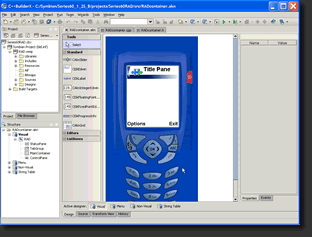
It was only released in the last couple of days, but one of the big changes in this one over v1.0 is the addition of a Visual Designer for Series 60 applications (the phone-looking thing in the screenshot above is not an emulator, it’s actually the Form Designer).
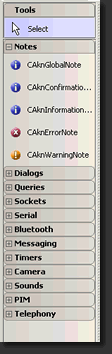
There are normal GUI-type components, but there are also non-visual components for everything from interfacing with BlueTooth, accessing the camera on your phone, the Address Book, etc. Obviously, a Visual Designer is no substitute for synaptic activity, but it does seem to make the whole process more approachable. I had my Hello World Symbian app up and running in an emulator in about 5 minutes, and debugging it on the device via Bluetooth in about 5 more. Now, all I need is a good idea for an app 🙂
There’s a trial version available here (the Mobile Studio link partway down the page. Mobile Studio includes Java and C++ in the same IDE) and we should have a Flash-based demo available shortly.