OK, one more topic to go and then we’ll leave the modelling surface in ECO for awhile to look at other areas. Today’s topic is Association classes. (BTW. I’ve borrowed the idea for this example from the MeetingManager example that ships with Delphi, but the implementation varies a little bit.)
Let’s forget ECO for a second and talk about why we might want Association classes in general.
Think of the model we looked at in the Derived Association example last time. Here it is again to jog your memory.
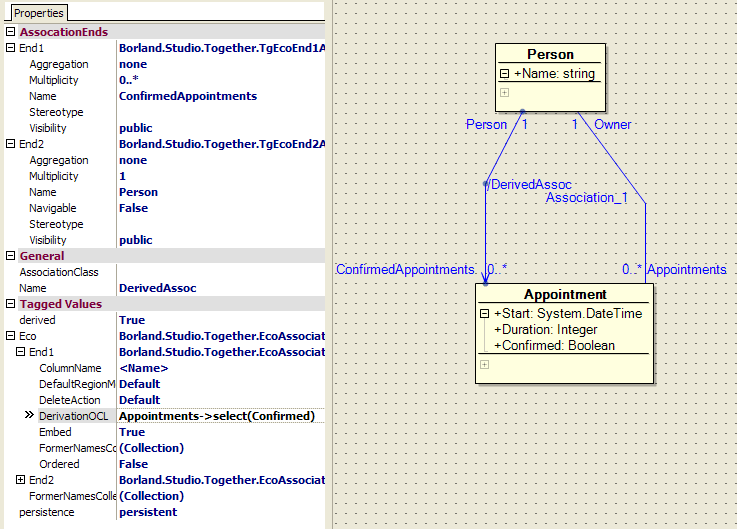
We have a Person class and an Appointment class, and a relationship between them. The Appointment class has attributes for Start, Duration and one for whether or not it is confirmed. It’s this Confirmed attribute I want to focus on.
There is an argument that the Confirmed attribute does not belong on the Appointment class because you don’t actually confirm an appointment, only whether you will attend the appointment. This problem is highlighted if you consider the case of a meeeting with multiple attendees. You need to allow for the fact that some people will attend and some won’t. (Note: The example in this tutorial doesn’t support multiple Person’s per appointment, but it would be reasonable to expect this to occur in a real world application). So where does the Confirmed attribute belong if not on the Appointment ? I’m pretty sure it doesn’t belong on the Person class. The argument goes that Confirmed is actually an attribute of the relationship between the Person and the Appointment. Put another way, you do not confirm an Appointment, you confirm a Person’s participation in an Appointment.
Let’s think of another example. The example that was used to explain this concept to me was employment. If you have a Person class and a Company class, and a relationship between them that indicates employment, where would you put the Start Date of the employment. You wouldn’t put it on the Person (what if they have multiple jobs) and you wouldn’t put it on the Company (what if they have multiple employees). StartDate is really an attribute of the employment itself, which in this case is an association between the two classes.
You may not agree with either of these examples, and there are certainly other ways you can model them. That’s OK. Like most things in software development, there is usually no one right way of doing anything. But Association classes are a perfectly valid modelling construct to use, and can be extremely powerful (more about that further down). Try using them for awhile. Dismissing something from a position of authority is fine, dismissing something from any other position is kinda scary.
So, how do we create an attribute on an association? Well, perhaps not surprisingly, we use an Association class. We create a class and relate it to our association. Any attributes we want to add to the association, we add to our Association class instead. Let’s look at how we might model the changes to our Appointment we discussed above.
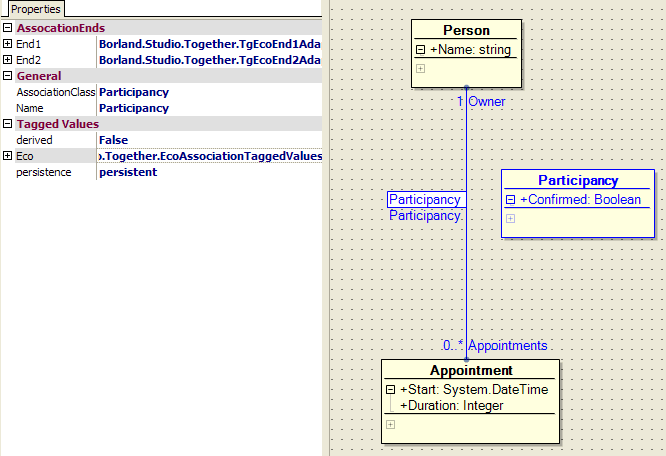
I’ve removed the Derived Relationship for now, but we’ll add it back later. You can see I’ve removed the Confirmed attribute from our Appointment, and added another class called Participancy which contains our Confirmed attribute. this Participancy class is going to be our Association class. An Association class is just a standard ECO class, you don’t do anything special when creating the class to make it an Association class. Just select the association between the two classes and enter the name of the Association class, in this case Participancy, into the AssociationClass attribute. Just to make it stand out, I’ve also change the foreground colour of my participancy class.
So, that was pretty easy, but what does it all mean? In the diagram below, I’ve tried to show what the above arrangement looks like in sourcecode. Note, I’ve built this diagram manually, purely to try and explain what is going on. Don’t go looking for a picture like this in the IDE.
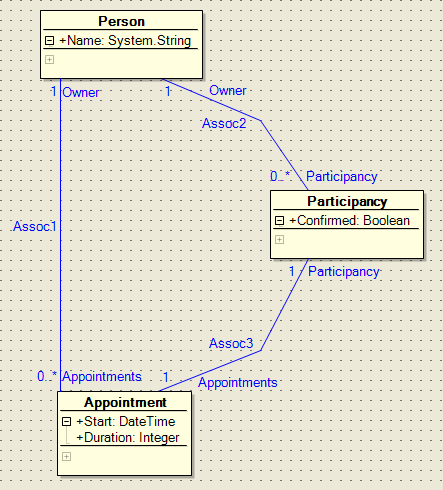
As you can see, we still have our association between Person and Appointments, and we can navigate that with absolutely no reference to our Association class. However, we also have a path between Person and Appointment that goes via our Association class. This effectively gives us two ways of navigating from Person to Appointment. One way we use the existing direct association, and the other way we go via the Association class.
From a Person object, we have an association to a collection of Participancy objects, one for each Appointment we have an association with. From an Appointment object, we have an association back to a single Participany object. This makes sense as an Appointment is only associated with a single Person.
So, I’ll repeat, what does it all mean? Well, it means that I can navigate from my Person to my Appointment (or vice versa) a few ways. Starting at my Person object, I can still say self.Appointments which will return me a collection of Appointment objects, but I can also do this:
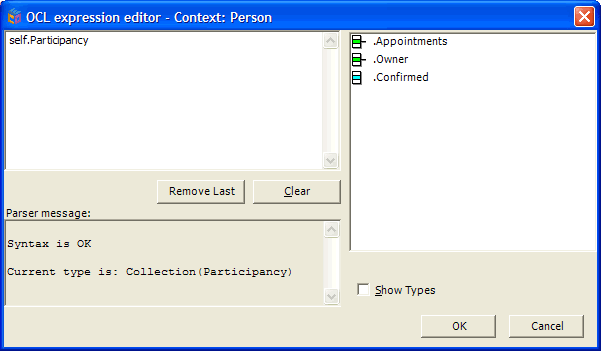
Notice my context (in the caption bar) is still Person. As it says down the bottom, self.Participancy will return me a collection of Participancy objects. Also note on the right hand side that each of these Participancy objects have the confirmed attribute, as well as an Appointments collection and Owner.
If we use that Appointments attribute of the Participancy object by using OCL like this:
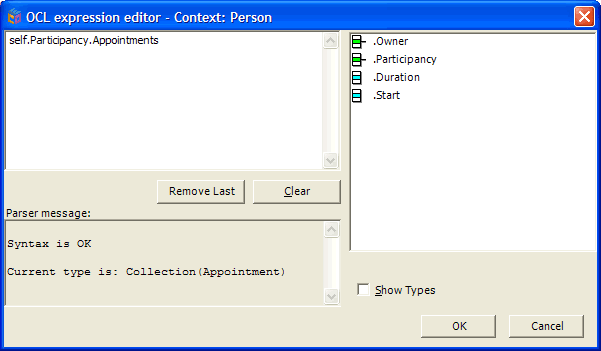
We are now getting back a collection of Appointment objects, with the correct looking attributes (but note, as I mentioned before, our Appointment class now has a Participancy attribute as well).
Using OCL like this:
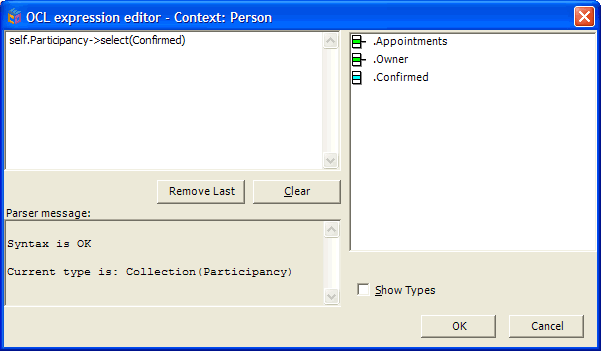
We are now getting back a collection of Participancy objects, but only those where the Confirmed attribute is True. And to complete the set, if we use OCL like this:
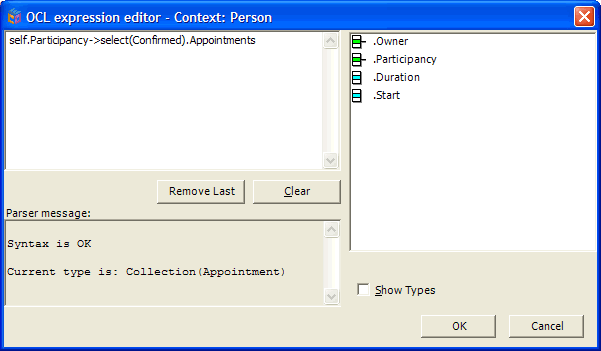
We are getting back a collection of all Appointments for this Person that are confirmed. Of course, you can access things in a similar way from C# or Delphi code, as the attributes are there in code, there’s no black magic going on (We’ll look at accessing ECO from code in much more detail in a later article)
So,hopefully that gives you some feeling for accessing the attributes of an Association class. But my model is still broken, I need to put back the derived relationship from last week, but this time using our Association class. this is pretty easy now, as the last lot of OCL I showed is exactly the OCL I need. So, like last week, create your one way association between Person and Appointment, set it as Derived and Transient, and enter the OCL shown below in the DerivationOCL property
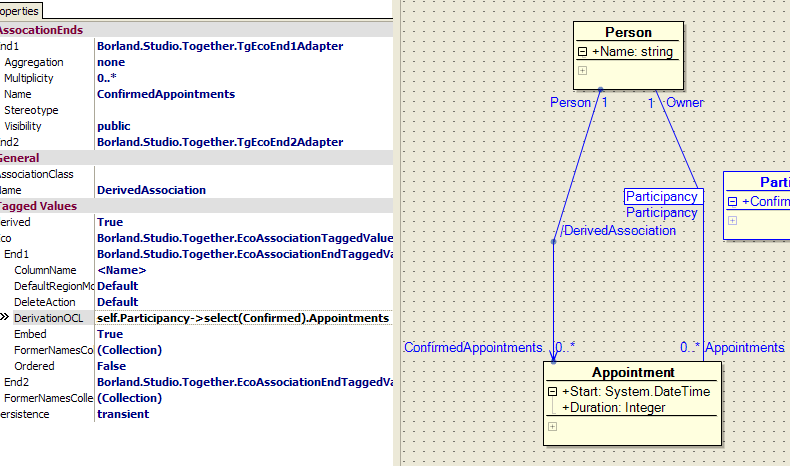
Now, our model is restored and our ConfirmedAppointments derived relationship should work as before. However, by using our Association class, we have hopefully more correctly modelled the true nature of our system. In addition, hopefully you realise that our Participancy class, while an Association class, is still just a class, so it can have attributes, methods and even associations with other classes. Think about that last one for awhile and you might start to see some interesting applications for Association classes.
Like I said before, a lot of times this comes down to personal taste. I’m very happy to argue the relative merits of Association classes, but only if we can do it over a drink 🙂
Be the first to leave a comment. Don’t be shy.