At the end of April I’ll be speaking at the ADUG Symposium on issues around porting Delphi/Win32 apps to Delphi/.NET. I’ve spoken at Borcon and other conferences with most of these guys before, but never in such a condensed setting. AND I’m at the end of the day. Bloody hell, talk about pressure.
Archive for the ‘Misc’ Category
Hunter Valley, Australia


© 2004, Malcolm Groves
Derived Associations
OK, we’ve spent the last few days in the model, talking about Packages, and all sorts of Derived Attributes. I want to spend a bit more time in this area, specifically on Derived Associations and Association Classes, then we’ll head off to other areas such as Persistence and Optimistic Locking, before starting to look at UI stuff. Feel free to let me know other areas you’d like to see covered.
OK, let’s look at Derived Associations. I’m assuming you’ve worked through the ECO Tutorial on Associations, or at the very least have created a few associations in ECO before. I won’t be covering the same territory here. If you’re not comfortable creating associations and what all the bits like Multiplicity mean, then off you go, this’ll still be here when you get back.
Look at the model below. I’m trying to stick with the same type of problem domain for a few articles, so this is still in the realm of Appointments (albeit cleaned up a little, just to keep it simple).
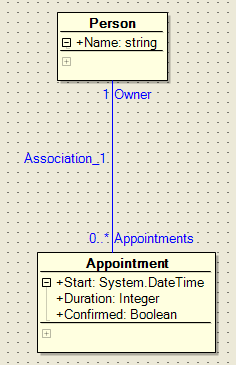
We have a Person class and an Appointment class, with an association between them where an Appointment can belong to only one Person, and a Person can have zero to many Appointments. Note however, that the Appointment has a Confirmed attribute. You may decide that you need to deal with only confirmed appointments so often, that you want another association between these two classes that only displays appointments that have the Confirmed attribute set.
However, this isn’t really a new association, as it should be possible to calculate the collection of confirmed appointments from our existing association. If you’re thinking that kinda sounds like Derived Attributes, you’d be right. We can define a new association, that doesn’t get persisted to the database, but exists in our model. We use OCL to derive the collection of Appointments we want to appear as part of this association.
So, in the model below, I’ve added a new association between the two classes. You define the association pretty much the same way you define any association. However, note I’ve set it to be a one way association (by setting the Navigable property on the Appointment end (End2) to False). This association is for navigating from the Person down to the Appointment. In this scenario we can still use our existing association to get from the Appointment back up to the Person. Whether an Appointment is confirmed or not does not change the Person who owns it.
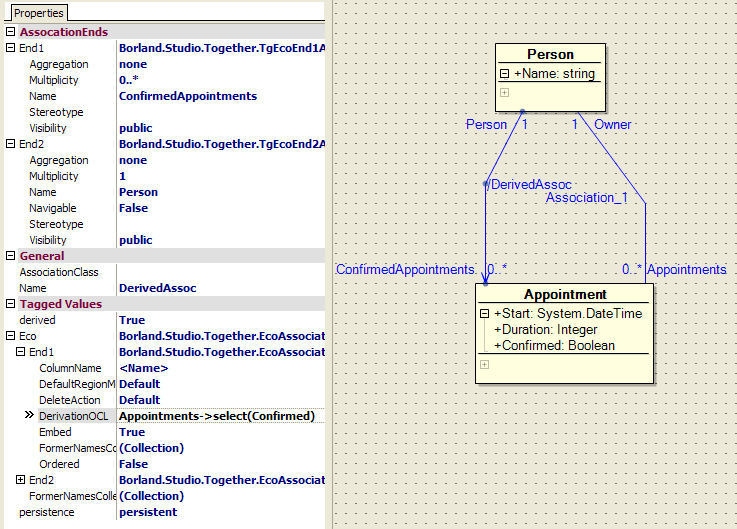
Note I’ve also set the derived property to True, and the Persistence property to Transient. Lastly I’ve specified some OCL in the DerivationOCL property. This is the OCL that is going to determine which Appointment objects appear as part of this association:
Appointments->select(Confirmed)
This is basically saying, from all Appointments associated with this Person, select the subset where the Confirmed attribute is True.
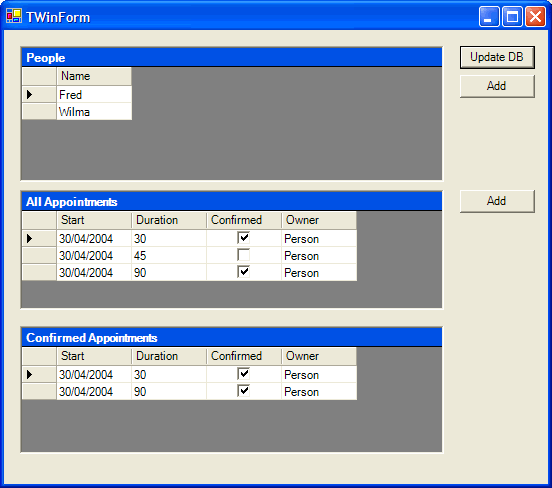
The screen shot below shows the two associations at runtime. Person.Appointments shows all appointments for a specific person (the second grid from the top), while Person.ConfirmedAppointments (the bottom grid) shows only those appointments for a specific Person that have the Confirmed attribute set to True.
Derived Attributes Part 3 – Reverse Derived Attributes
If you take a look at sourcecode for the Finish derived attribute declaration from the previous model, you’ll note it looks like this:
property Finish: DateTime read get_Finish;
i.e. it is a read-only property. This kinda makes sense, given what we now know about derived attributes. If the value of my attribute is calculated, the framework by itself cannot figure out how to undo it i.e. how to tear apart the value into the original parts used to calculate it in the first place. This may not even be algorithmically possible.
However, sometimes it is possible, and in these cases, we need a way to tell the framework how to do it. Let’s stick with our Appointment example. The Finish time was derived by taking the Start time and adding the number of minutes held in the Duration attribute. In my case, if someone assigns a new value to the Finish attribute, I’ll change the Duration to reflect the difference between my Start time and this new Finish value.
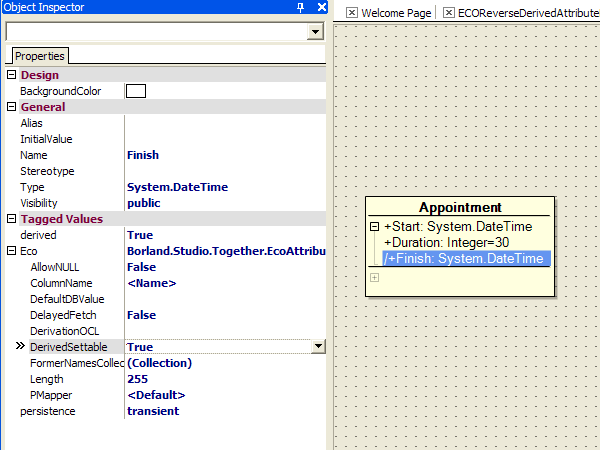
How? Well, select the Finish attribute in your model, and in the object inspector, set the DerivedSettable property to True. If you now look at the sourcecode for the Finish declaration, a setter method (called set_Finish) has been added. We’ll add our logic to recalculate the Duration in this setter method, but first we need to tell ECO that we are changing the logic in here, and to leave it alone in the future. We do this by removing the [ECOAutoMaintained] attribute from the property declaration in our sourcecode (Don’t worry, there is a comment reminding you to do this in the generated setter method). My new set_Finish method looks like this:
procedure Appointment.set_Finish(Value: DateTime);
begin
// If you add user code here, please remove the [EcoAutoMaintained] attribute
// from the property declaration in the interface section
Duration := Convert.ToInt32(Value.Subtract(Start).TotalMinutes);
end;
The new value for Finish is passed in as the Value parameter. I subtract from this the Start time, and use the the difference in minutes to set the value of the Duration attribute.
What this means is that not only can I set the Start and Duration and it will calculate the Finish, but I can set the Finish and it will calculate a new Duration.
Derived Attributes Part 2 – Code Derived Attributes
Ok, so yesterday we looked at adding attributes to our ECO classes where the value of those attributes was calculated at runtime using OCL. If you haven’t already, look through the link I gave yesterday to Anthony Richardson’s OCL Tutorial, as it is possible to embed some fairly rich logic into your model using this language.
That said, lets not kid ourselves. Delphi and C# are much richer languages than OCL, so there will come a time where either it’s not possible to calculate your attribute’s value using OCL, or where you are more comfortable doing it in code. So, let’s look at Code Derived Attributes.
I’ve created a new class called Appointment, which has a Start attribute of type System.DateTime, which represents the start time of the Appointment and a Duration attribute of type Integer, which is the length of the Appointment in minutes. I’ve also then created a Derived Attribute called Finish, also of type System.DateTime. Just like yesterday, I’ve set its Derived property to True and its Persistence property to Transient. However, unlike yesterday, I have not specified any OCL to calculate the value.
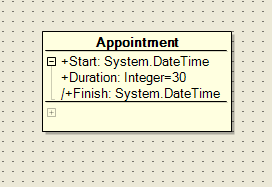
When the ECO framework finds a derived attribute that has no OCL, it goes looking for a method, using reflection, of a particular signature and name, specifically:
function <Attribute Name>DeriveAndSubscribe(reevaluateSubscriber, resubscribeSubscriber: ISubscriber): system.object;
In this case, my attribute is called Finish, so it looks for a method called:
function FinishDeriveAndSubscribe(reevaluateSubscriber, resubscribeSubscriber: ISubscriber): system.object;
If it finds this method, it executes it, and uses the return value as the attribute’s value. So its your job inside this method to do whatever you need to calculate the attribute’s value. In my case, I want to add the Duration in minutes to my Start time, so my method looks like this:
function Appointment.FinishDeriveAndSubscribe(reevaluateSubscriber, resubscribeSubscriber: ISubscriber): system.object;
begin
AsIObject.Properties[‘Start’].SubscribeToValue(reevaluateSubscriber);
AsIObject.Properties[‘Duration’].SubscribeToValue(reevaluateSubscriber);
result := Start.AddMinutes(Duration);
end;
Now hang on a sec, the last line makes sense, but what are the first two lines doing?
Well, let’s step back a bit. ECO does not actually derive the value of your attribute every time someone asks for it. Instead it caches the value of the attribute after it is first calculated, and returns this cached value on subsequent requests, provided the attrbiute is not marked as out of date. How would our attribute get marked as out of date? Well, that’s where the first two lines of code above come in. We’ve subscribed to be notified whenever Start or Duration are changed. When we are notified, the ECO framework will flag our Finish attribute as out of date. Then, when the next request for its value is made, before the cached value is returned this flag will be checked and, the value of the atribute will be recalculated.
Subscriptions in ECO are an important topic that I plan to cover in future posts, but in the meantime, make sure you subscribe to any other attributes on which you are depending.
Not quite as easy as using OCL, but way more powerful, as you now have full access to the entire .NET Framework to use in calculating your attribute’s value.
What is ECO?
Oops, I’ve had a few emails from people after the last couple of ECO posts I’ve made, asking a completely legitimate question: "Err, what is ECO?"
Sorry. ECO stands for Enterprise Core Objects, and is the Rapid MDA (Model Driven Architecture) tool included in the Architect editions of Borland Delphi 8 and C#Builder. The aim of ECO is to increase the productivity of developers by using the UML model of your application as the basis for execution at runtime. ECO is for .NET, obviously, but is the evolution of the Bold product for Win32 Delphi which has been in production for many years (and won a Jolt Productivity Award, BTW)
Here are some other links to info:
- Technical ECO Whitepaper
- ECO Tutorials : Delphi / C#Builder
- Recorded Demo (requires free registration)
- Delphi 8 Trial download
- C#Builder Trial download
- OCL Tutorial (specifically for Bold, but applies to ECO as well)
The version of ECO in Delphi 8 is newer than the C#Builder version, and as such has a few more features, but at their core they are similar enough. The next version of C#Builder should include a newer version of ECO again, compared to what is in D8. This is just the nature of leapfrogged product releases.
Anyway, hopefully that gives some more info. As I continue my exploration of ECO, or as I answer questions from customers, I’ll try and post more ECO bits and pieces here.
Derived Attributes Part 1 – OCL Derived Attributes
Following on from yesterday’s post about UML Packages in ECO, today I thought I’d spend some time looking at Derived Attributes in ECO classes.
When defining an attribute on a class in ECO, the default behaviour is that this attribute’s value will be persisted to your datastore. Sounds reasonable. However, sometimes an attribute’s value can be calculated, based on other attributes on the same class, on other classes, the phase of the moon, whatever. Think Calculated Fields in Delphi database terminology, except these are attributes on a class, not fields in a dataset.
There are a couple of variants of Derived Attributes: those who’s value is calculated using OCL (Object Constraint Language) defined in the model and those whose value is calculated using sourcecode. There are also these things called Reverse Derived Attributes, which allow you to assign a value to a derived attribute, and deconstruct that back to the various attributes from which it was originally derived. We’ll cover using OCL to derive an attribute’s value in this post, and I’ll cover the others in subsequent posts.
So, below you can see a fragment of a model. I’ve removed everything unrelated to this example, so that’s why it looks so empty. Two classes, Order and OrderItem, and an association between them. An Order is associated with 0..* OrderItems, and OrderItem is associated with only one Order. In addition, an OrderItem has two attributes, Quantity and UnitPrice, both of which are persisted to the datastore. Nice and simple.
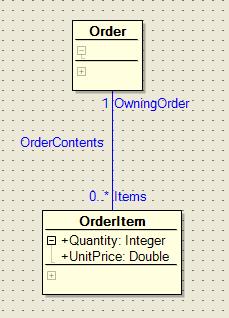
Now, I want to add an attribute to the OrderItem class called TotalPrice, which, surprise suprise, represents the total price of the OrderItem. There is no benefit in storing this in the datastore, as this value can be calculated by multiplying the Quantity by the UnitPrice. So, lets create an OCL-based Derived Attribute
Right-click on the OrderItem class, and select Add | Attribute. In the Object Inspector, set the Name to TotalPrice, the Type to Double, Derived to True and Persistence to Transient (meaning it won’t be stored in the datastore). It should look something like this:
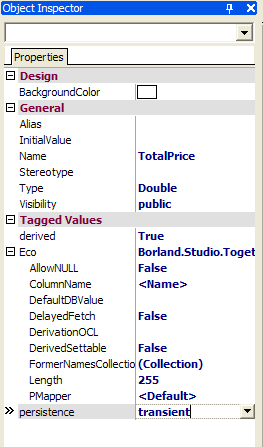
Now, we need to specify how this attribute gets its value. This is where we use OCL. Enter the following OCL into the DerivationOCL property of our attribute:
UnitPrice * Quantity
That’s it. Now when we access this TotalPrice attribute, or update the Quantity or UnitPrice attributes, whether via code or via our app’s UI, our TotalPrice value will be calculated. Pretty easy, huh? As our TotalPrice attribute and the Quantity and UnitPrice attributes are all part of the same class, we can just reference them directly. Now we’ll look at using attributes from other classes.
Let’s add another attribute, this time a ShippingQuantity attribute on our Order class. This is going to represent the the total of all Quantity attributes for all OrderItems associated with this Order. Like before, set the Name to ShippingQuantity, the Type to Integer, Derived to True and Persistence to Transient. In the DerivationOCL property in the ObjectInspector, enter some OCL like this:
Items.Quantity->sum
Basically this is saying the result is the sum of all the Quantity attributes from the OrderItem classes associated with this Order. Note the context is the Order class, so Items maps down to the name of the association. It might be clearer to think of this as Self.Items.Quantity->sum, where Self is my Order object.
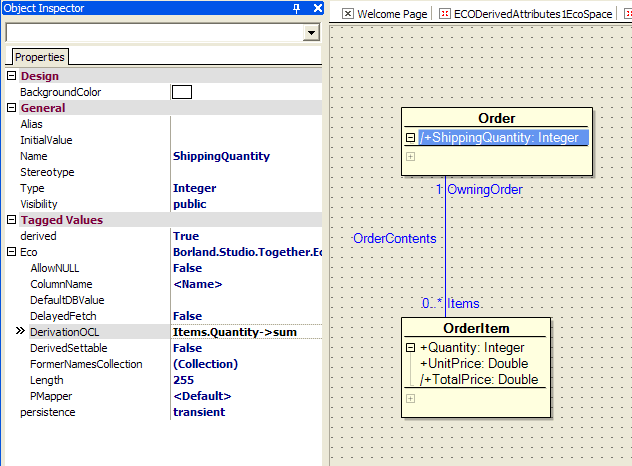
That’s it. Again, anytime this attribute is accessed in code or via the UI, it will return the calculated value.
Some comments are probably required. OCL is a fairly powerful langauge. You can have such things as conditional branching, iterators, and there are many built in methods to aggregate values, sort, filter, etc. However, it is of course nowhere near as powerful as Delphi or C#. Don’t get too carried away trying to express all your logic as OCL. A general rule is put what is easy to represent in OCL in the model, and use code for those things not easily represented as OCL, or that are tricky enough to require some serious debugging (We’ll look at how to do a Code-derived attribute later on).
That said, there are still some big productivity and stability gains to be had by representing more of your logic in your model, allowing the ECO framework to take care of more of the boring, plumbing code and allowing you to focus on the more interesting, tricky business logic, where you truly add value.
Lastly, how can you get more info on OCL? I’ll be posting a link shortly to a bunch of ECO information, and I’ll include a very useful OCL reference Anthony Richardson wrote. It’s aimed at Bold, but pretty much the same rules apply.
UML Packages in ECO
One of the common questions that I’ve been asked when talking about ECO concerns the CoreClasses file, and whether there is any way to split your ECO objects up amongst multiple files, or whether they must all live in this one file. The answer to splitting up your ECO object model is using UML Packages.
I’ll use Delphi for this example, but it should be pretty easy to follow in C#Builder.
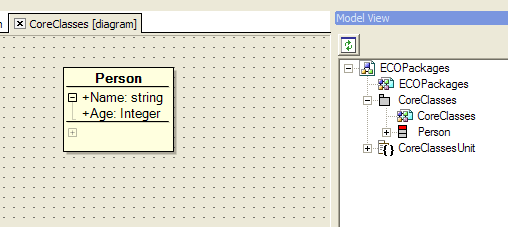
First, I create a new ECO WinForms app, go to the Model View and bring up the CoreClasses diagram. I’ll create a simple Person class, like so:
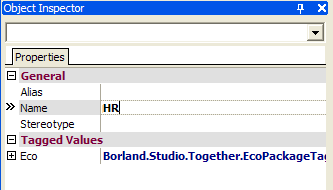
Next, I want to define another class in a seperate package, so I’ll first create a new package. You can go the File | New route, but I find it easier to right-click on the ECO Packages node in the Model View and select Add | ECO Package. This will result in a Package_1 package node being added to the Model View, but lets rename it and save it somewhere sensible. Select the grey Package_1 node and in the Object Inspector set the name property to HR.
You’ll also note in the Project Manager it has created a Package_1Unit file, right-click on this and Save As HRUnit.pas.
So, now we can bring up our HR diagram and create a new class, in this case, Employee.
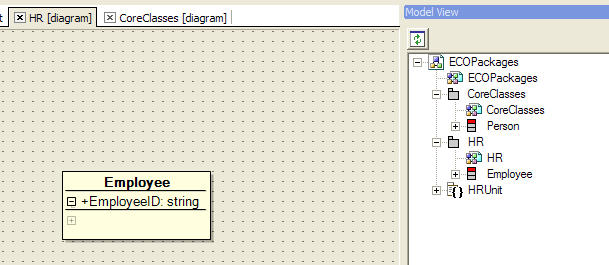
We now have two packages, with one class in each package. Importantly, we also have seperate source files for each package, so we can potentially have two developers working on these files concurrently. However, we probably want to define relationships between the classes in different packages. So to do this, we can make use of Shortcuts.
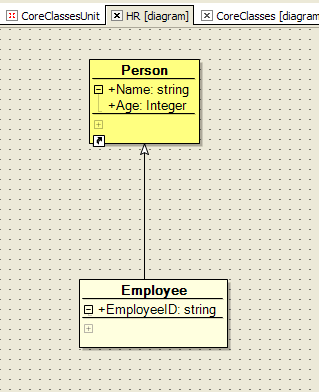
In my case I want my Employee class in my HR package to descend from my Person class in my CoreClasses package. If I bring up my HR diagram, then in my Model View right-click on my Person class I can select Add as Shortcut. This results in the Person class appearing on my HR diagram, but with a Windows-like shortcut icon in the bottom left corner. It hasn’t added the Person class to my HR package, but it has given me an element in my UML designer that I can use to define my inheritence relationship (or association, or whatever it is that you are wanting to do). I’m also trying to get in the habit of changing the BackgroundColor attribute for my Shortcuts in the Object Inspector, just so they really stand out from my "normal" classes. In this case, I’ve made my shortcut yellow, but of course that’s totally up to you.
The other thing to make sure is that in your ECOSpace, you use the Select UML Packages button to include your HR package into your ECOSpace, along with your CoreClasses package
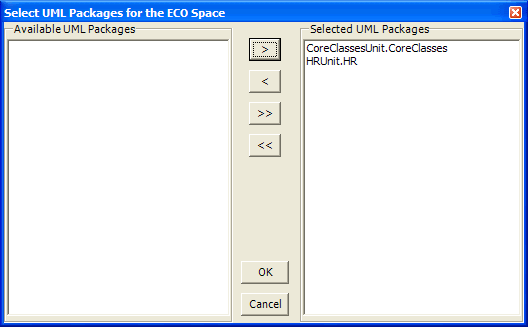
That’s it. You can now go crazy and define as many UML Packages as you like. Of course, it then raises a whole other question of how to break up your design into packages, but that’s not specific to ECO, and not an argument I intend to get into today 🙂
Seoul, South Korea

© 2004, Malcolm Groves
Leura, Australia

© 2004, Malcolm Groves