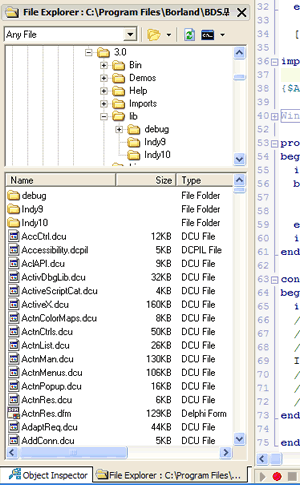
FileExplorer is a free add-in for Delphi 2005, which provides Explorer-like functionality in a dockable window inside the IDE. Some of the features include:
- Fully dockable, just like the standard IDE Windows, including support for the IDE’s Desktop’s feature, auto-hide, etc.
- Smart Resize, which changes the window layout depending on its location.
- Drag and Drop from FileExplorer to many parts of the IDE (Project Manager, Code Editor, etc)
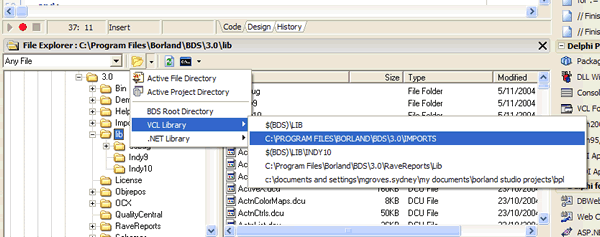
- Jump to the current Project directory, the active File’s directory, or any directory in your VCL or .NET Library Path.
- Open a Command Prompt or Windows Explorer in the selected directory.
 |
Requirements
Basically, FileExplorer requires Delphi 2005. If you can run Delphi 2005, you should be OK for FileExplorer.
 |
Version
Currently, FileExplorer is in Beta release. There are a bunch of To Do’s below, but if you have bug reports or feature suggestions, please send them to me (you’ll have to de-mangle the email address before sending).
To Do
- Save Path, etc settings between instances.
- Extend “Go To” folders.
- Add support for Favorites.
- Integrate into Delphi Options dialog.
- Think up a cooler name.
History
Beta 0.71 – 10 November 2004
- Change to installer to stop copying packages into System32 directory.
Beta 0.7 – 7 November 2004
- Update to Delphi 2005
- Added support for VCL and .NET Library Paths
- Added Current Path info to Caption
Beta 0.6 – 27 March 2004
- Fixes the issue where FileExplorer would not appear if contained in the IDE’s active desktop at startup
Beta 0.5 – 22 March 2004
- Initial Release.
Download
- Version 0.71 CodeCentral #21575
Be the first to leave a comment. Don’t be shy.