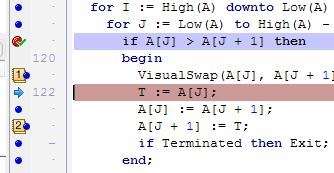
Sticking with the theme of small but useful features in Delphi 2010, did you know you can now drag-and-drop various code-editor gutter icons?
Let’s say you’ve set a breakpoint, and right-clicked to adjust its properties, such as pass count, thread, group and various other settings. Then you realise you actually wanted this on a different line instead. In the past you’d have to create a new breakpoint and set all those properties yet again.
In Delphi 2010, simply left click on the breakpoint gutter icon, and while holding the button down, drag it to the correct line.
Further, if you want to duplicate a breakpoint, including all of its properties, just drag it while holding the Ctrl key down.
The same drag-and-drop trick works on Bookmark icons, and at debug time, on the Execution-point icon (the blue arrow). Note, the Ctrl key doesn’t have any effect on these two.
8 Comments
See also here for a more detailed description of more features.
That’s really cool!
However, I have no idea at all what effect to expect when dragging the execution point arrow to a different line… would the code continue to execute as I drag? What if I drag to a line that wouldn’t otherwise be reached? What if I drag it to a line that has already been executed? Can I now step backwards?
Could you elaborate a little on that (i.e. dragging the execution point)?
Oliver : You’ve been able to do this for quite awhile in the CPU view, and for a few releases by right clicking, but this just makes it easier. In my experience this is one of those features that expects the developer to know what they are doing. If you drag it somewhere and all the dependencies for that location are satisfied, no problem. Drag it somewhere where it’s expecting something to be setup or created, and you skipped that line, then watch the fireworks 🙂 Maybe that is what you want, it’s very useful for testing error handling or paths in your code that are otherwise hard to simulate.
Oh, and yes you can drag it backwards. And no, the code wouldn’t execute while you drag, the arrow is only available when the debugger has stopped on a particular line. IT repositions the execution point, and then F7, F8, etc will execute from the new position.
Thanks for the details. That’s quite scary, actually… 😉
Are there any precautions for preventing accidental drags?
🙂 It’s not that scary really. Typically you’ll only be dragging it small distances, inside an IF statement or something, not half a unit away.
Accidental drags? Hmmm, not sure. Less coffee maybe? 😉
while you’re on the topic of “small but useful”, it’s great to see the bookmark icons are (finally!) legible!
wow … it’s cool 😉 thanks