I’ve been doing some work in another .NET tool, which shall remain nameless for what it’s worth :-), and I’ve found myself missing a few features from C#Builder and Delphi 8. I don’t want to start a "My tool’s better than your tool" war, but I guess it’s not until you use another tool that you notice some of the features of the tool you’re used to.
Case in point: Exceptions. When an exception occurs during debugging, this other tool gives me a modal dialog with the details of the exception, but being modal, I have to dismiss it before I can go looking for my error. Problem is, my memory sucks. So, once I’ve dimissed this modal dialog, I invariably forget some of the details. I believe there is a magic string I can enter into the watch window to get the details of the exception, but I don’t think it’s documented and buggered if I can remember what it is.

C#Builder and Delphi 8, on the other hand, give me the same modal dialog, but notice in the screenshot above, the checkbox in the bottom right corner that says Inspect Exception Object? If I leave that checked, I get a Debug Inspector showing all the details of the Exception object that I can dock against my code while I go looking for my error.
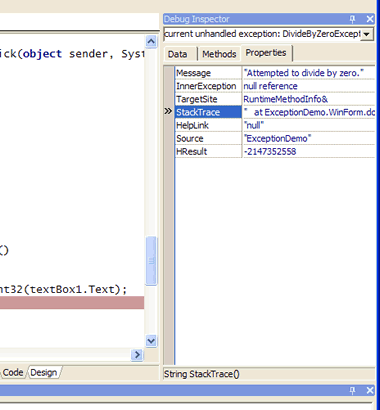
A little thing maybe, but a little thing that I didn’t really notice until it wasn’t there.
Be the first to leave a comment. Don’t be shy.