The Canberra event last week went very well, and this week is Perth and Adelaide (I’m writing this on the flight to Perth). We’ve also just added a Brisbane event, again in conjunction with ADUG, and are about to add Auckland and Christchurch (I may have just leaked that, I don’t think the notification is going out for a bit, so just keep it between us, ok?).
Posts Tagged ‘Embarcadero’
Delphi 2010 in Canberra, Adelaide and Perth
As mentioned earlier, I’ll be presenting sessions on Delphi 2010 in Canberra, Adelaide and Perth over the next few weeks. The venues and times have all been sorted out now, go here for more details.
Drag-and-drop Gutter Icons in Delphi 2010
Sticking with the theme of small but useful features in Delphi 2010, did you know you can now drag-and-drop various code-editor gutter icons?
Let’s say you’ve set a breakpoint, and right-clicked to adjust its properties, such as pass count, thread, group and various other settings. Then you realise you actually wanted this on a different line instead. In the past you’d have to create a new breakpoint and set all those properties yet again.
Refactoring Support for Attributes in Delphi 2010
I mentioned earlier that a lot of work in this release had gone into smaller features and feature tweaks. One of the results is that the IDE keeps giving me pleasant surprises. I’ll try to do something without even really thinking about whether it should work or not, and find that it not only works, but that it goes a little further than I might have thought.
One example is around Refactoring support for Attributes. If you look at my first, simple example of Attributes, one of the many things wrong with it is that the Attribute name is terrible. Unless I never plan on writing more than one Attribute, MyAttribute is probably not the best choice.
More Attributes in Delphi 2010
In my previous post on Attributes in Delphi 2010, I showed a basic view of the mechanics involved in creating, applying and querying Attributes. I didn’t really cover an example of why you might use them.
Probably the most common example given is for persistence, and indeed, someone over on the Wings of Wind website has posted an example along those lines. I’d like to show off a different use for them: Validation.
Casting an Interface Reference to the Implementing Class in Delphi 2010
Not all the new features in Delphi 2010 are big. In fact, the team have spent a lot of time implementing many small features, fixes and tweaks. Some of these may not seem to amount to much individually, but they not only add up to significant impact, but greatly add to the polish of the product. I expect this will be one of those releases that keeps serving up little delights and surprises for a long time.
One of the features in Delphi 2010 that I expect will spawn much debate is the ability to cast an interface reference back to the type of class that implements it.
RTTI and Attributes in Delphi 2010
RTTI (Runtime Type Information) has had a major overhaul in Delphi 2010. RTTI is a central piece on which the Delphi IDE is written, and as such has been around since the first release, however I’ve heard from a number of people over the years that they’d tried to use RTTI and found it too difficult and arcane, especially compared to the Reflection API’s in Java and .NET. That’s a real shame, as the ability to write code to query the details of other objects, without knowing the type up-front, is really powerful.
However, I think that complaint will be a thing of the past with this new API. It’s been not only extended to make it more capable, it is also now much more approachable and easy to use.
One of the new features that I’m very excited about is support for Attributes in Win32. I’m working on a larger example, but here’s a quick run through of creating and then querying custom attributes.
Custom attributes are simply classes that descend from TCustomAttribute. They can have properties, methods, etc, like any other class:
  MyAttribute = class(TCustomAttribute)
  private
    FName: string;
    FAge: Integer;
  public
    constructor Create(const Name : string; Age : Integer);
    property Name : string read FName write FName;
    property Age : Integer read FAge write FAge;
  end;
No real surprises here, and the constructor is implemented exactly as you’d expect.
Next, we can apply our attribute to our class:
  TMyClass = class
  public
    [MyAttribute('Malcolm', 39)]
    procedure MyProc(const s : string);
    [MyAttribute('Julie', 37)]
    procedure MyOtherProc;
  end;
Here I’ve applied it to both methods, but note I’ve supplied different parameters to the Attribute. Also note the order of the parameters matches the order in the constructor. This is not just limited to methods, you can apply attributes to properties, entire classes, all sorts of things.
Of course, there’s no point adding attributes if you can’t read them from somewhere, so here’s some sample code that uses the new RTTI API to query for our attributes, and display the details in a listbox:
procedure TForm3.Button1Click(Sender: TObject);
var
  ctx : TRttiContext;
  t : TRttiType;
  m : TRttiMethod;
  a : TCustomAttribute;
begin
  ListBox1.Clear;

  ctx := TRttiContext.Create;
  try
    t := ctx.GetType(TMyClass);
    for m in t.GetMethods do
      for a in m.GetAttributes do
        if a is MyAttribute then
          ListBox1.Items.Add(Format('Method = %s; Attribute = %s, Name = %s, Age = %d',
                                    [m.Name, a.ClassName, MyAttribute(a).Name,
                                     MyAttribute(a).Age]));
  finally
    ctx.Free;
  end;
end;
First I grab a reference to the RTTI Context, and load it with the ClassType of my class. I then do a for..in over the methods in my class, and for each method do a for..in over the attributes. Then I check if the attribute is my custom attribute, and if so, grab the values of Name and Age and show them in a list box.
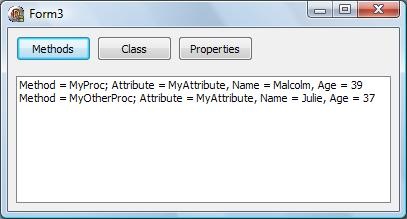
As I mentioned earlier, I’m working on another example which is a little more useful, but hopefully this gives you a little taste of some of the new stuff coming in 2010. Also, don’t forget to watch the preview videos at http://www.embarcadero.com/rad-studio-2010/, and subscribe to get notified when new ones are published.
Aussie Delphi 2010 Sneak Peeks in Sydney and Melbourne
I’ll be presenting the RAD Studio 2010 Sneak Peeks in Sydney and Melbourne next week. There are more details here, but if you are in town I’d encourage you to come along. There’s some very cool stuff in this release.
And before you ask, yes, we’re working on other cities. Stay tuned.
IOUtils.pas – OO File System Access in Delphi 2010
Delphi has long had various functions to let you work with the file system, but one of the new features of Delphi 2010 are some nice wrappers for working with files, paths and directories.
IOUtils.pas is the file in question, and it’s definitely worth a look. Each time I’ve had a look in there during the Field Test I’ve found more interesting stuff to play with. While I’m still exploring it, I thought I’d post a few examples to show you the kind of things you can get up to.
Firstly, something easy:
procedure TForm2.Button2Click(Sender: TObject);
var
  Path : string;
begin
  if not TDirectory.Exists(edtPath.Text) then
    Caption := 'Invalid Path'
  else
    Caption := edtPath.Text;

  ListBox1.Clear;

  for Path in TDirectory.GetFiles(edtPath.Text, edtFilter.Text) do
    Listbox1.Items.Add(Format('Name = %s', [Path]));
end;
First we check if the path provided in the edtPath edit box exists. Assuming it does, we then use a for..in statement to get back each file in that directory that matches the filter passed in as the second parameter.
If you look a little further in IOUtils.pas, you’ll see TDirectory has a type declared in it called a TFilterPredicate:
TFilterPredicate = reference to function(const Path: string; const SearchRec: TSearchRec): Boolean;
One of the places it is used is in an overloaded version of GetFiles, like so:
procedure TForm2.Button1Click(Sender: TObject);
var
  Path : string;
  FilterPredicate : TDirectory.TFilterPredicate;
begin
  if not TDirectory.Exists(edtPath.Text) then
    Caption := 'Invalid Path'
  else
    Caption := edtPath.Text;

  ListBox1.Clear;

  FilterPredicate := function(const Path: string; const SearchRec: TSearchRec): Boolean
                     begin
                       Result := (TPath.MatchesPattern(SearchRec.Name, edtFilter.Text, False)) AND
                                 (SearchRec.Attr = faArchive);
                     end;

  for Path in TDirectory.GetFiles(edtPath.Text, FilterPredicate) do
    Listbox1.Items.Add(Format('Name = %s', [Path]));
end;
We implement the TFilterPredicate anonymous method to check that each file matches a wildcard pattern and that it also has its Archive flag set. We can then pass it into our call to TDirectory.GetFiles and our code in the for..in statement will only be called for files that match our criteria.
This is all fine for a single directory, but what if we want to walk over the full tree of directories? Easy, just alter our code to look like this:
procedure TForm2.Button3Click(Sender: TObject);
var
  Path, Directory : string;
  FilterPredicate : TDirectory.TFilterPredicate;
begin
  if not TDirectory.Exists(edtPath.Text) then
    Caption := 'Invalid Path'
  else
    Caption := edtPath.Text;

  ListBox1.Clear;

  FilterPredicate := function(const Path: string; const SearchRec: TSearchRec): Boolean
                     begin
                       Result := (TPath.MatchesPattern(SearchRec.Name, edtFilter.Text, False)) AND
                                 (SearchRec.Attr = faArchive);
                     end;

  for Directory in TDirectory.GetDirectories(edtPath.Text, TSearchOption.soAllDirectories, nil) do
    for Path in TDirectory.GetFiles(Directory, FilterPredicate) do
      Listbox1.Items.Add(Format('Name = %s', [Path]));
end;
We add another for..in statement before the existing one. This one for each Directory in TDirectory.GetDirectories. The second parameter indicates whether we only want to get the top level directories in the path we specify, or whether we want to do all directories , all the way down. In this case I’m specifying the latter. The Third parameter is actually another TDirectory.TFilterPredicate, so we could do further filtering of the directories that match, however I’m passing in nil so all directories will match. Just keep your wits about you while testing, and don’t test it with c:\ as I did
One thing to note, TDirectory.GetDirectories returns child directories of the path we’ve specified (and their child directories, etc if you’ve specified TSearchOption.soAllDirectories), but obviously not the path we pass in itself. That probably sounds obvious, but in this example we’ve subtly altered the behaviour a little, because the files in the directory we specify are not checked anymore. Now you’re aware of this, I’m sure you can figure out how to deal.
There’s a whole bunch more that can be done, such as encrypt files, move directories, etc. IOUtils looks to be a really powerful unit, and is well worth a little playing to get familiar with it.
Generic Interfaces in Delphi
Most of the examples I’ve seen of Generics in Delphi, use classes containing a generic type. However, while working on a personal project, I decided I wanted an Interface containing a generic type.
The project uses an in-process publish/subscribe mechanism, and I wanted a subscriber to have a separate Receive method for each event type, rather than a single method which contained a big case statement with branches for each event type. Equally, however, I didn’t want to have to define an interface type for each event type. What I wanted was to have a generic Subscriber interface, that took the event type as a parameter.
However, I had no idea if I could define a generic Interface, let alone implement one. Even assuming I could do both of those things, would Delphi be able to resolve the correct Receive method to invoke? Only one way to find out….
NB: In this example, I’ve stripped out most of the pub/sub stuff, just leaving the pieces needed to show the generic interfaces. I’ll write about the other pieces over the next few posts.
First, I implemented a few sample events. The contents of these are not that interesting:
TSomeEvent = class
  // other stuff
end;

TSomeOtherEvent = class
  // other stuff
end;
Then, I defined a generic interface
ISubscriber = interface
  procedure Receive(Event : T);
end;
This is the interface that will need to be implemented by my subscribers in order to receive events of a particular type. Note, the type of event is set up as a generic type T.
Then, my subscribers need to implement an interface for each Event type they want to receive, however because it is a generic interface, it’s pretty straight-forward:
TMySubscribingObject = class(TInterfacedObject, ISubscriber, ISubscriber)
protected
  procedure Receive(Event : TSomeEvent); overload;
  procedure Receive(Event : TSomeOtherEvent); overload;
end;
Note there’s no definition of a ISomeEventSubscriber and a ISomeOtherEventSubscriber interface, we can just use ISubscriber<T> and pass the type in in-place. We just need to implement the necessary overloaded Receive events.
You can see the rest of the code in the associated test project, but the above shows you the main aim. Implementing multiple interfaces, each with a strongly-typed Receive event, without actually having to define each of those interfaces.
So, does it work? Well, at my first attempt, no, it didn’t. No matter what type of Event I passed in, or via what interface, it always invoked the last Receive method.
 Rule of life #37: If it’s a choice between Malcolm having screwed up or the Delphi compiler architects, it’s probably Malcolm’s fault.
Yes, my bad. Barry Kelly eventually pointed out the error of my ways. I’d originally defined the generic Interface with a GUID. Habit, really. However, this meant that both ISubscriber<TSomeEvent> and ISubscriber<TSomeOtherEvent>, and indeed any other interface I defined off this generic interface, would have the same GUID. This combined with the fact that I was using an “as” cast to get the Interface reference from the TMySubscribingObject instance, confused Delphi into always giving me the same Interface reference.
Drop the GUID and drop the “as”, and it all worked beautifully.
In future posts I’ll show the other side of the equation, the Publisher, as well as the Event Broker in the middle. One other nice side-effect of indicating the events a class is interested in, using interfaces in this way, is that the event broker can simply inspect the interfaces implemented by a subscriber to know which events they are interested in subscribing to.